
THIS IS A TUTORIAL ON HOW TO REMOVE YOUR LAST NAME ON FACEBOOK. HERE'S AN EXAMPLE. https://www.facebook.com/razattitude
REQUIREMENTS:
1. MOZILLA FIREFOX
2. INTERNET CONNECTION
PLEASE FOLLOW THE STEPS BELOW.
1. Open Mozilla Firefox and navigate to Tools> Options. A small window will popup.
2. Click Advanced.
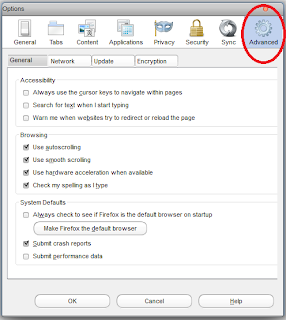
3. Click the Network tab.
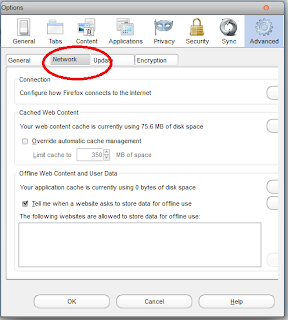
4. Now navigate to Settings and choose Manual proxy configuration.
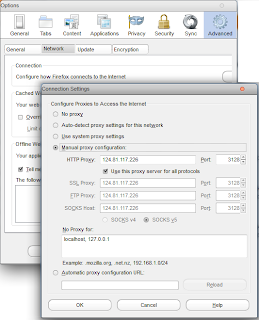
5. Find an Indonesian proxy on http://www.hidemyass.com/proxy-list and put it on your browser's manual proxy configuration.
6. Click okay and restart firefox. Navigate to google.com to check if your new proxy works.
7. If everything's working fine, go to Facebook.com and log-in your account.
8. Change Facebook's default language to Bahasa Indonesia.

9. Go to Account Settings and you can now remove your middle name and last name. Type your password to save changes.
10. You can now revert back to original facebook language and enjoy your custom facebook name.
REQUIREMENTS:
1. MOZILLA FIREFOX
2. INTERNET CONNECTION
PLEASE FOLLOW THE STEPS BELOW.
1. Open Mozilla Firefox and navigate to Tools> Options. A small window will popup.
2. Click Advanced.

3. Click the Network tab.

4. Now navigate to Settings and choose Manual proxy configuration.

5. Find an Indonesian proxy on http://www.hidemyass.com/proxy-list and put it on your browser's manual proxy configuration.
6. Click okay and restart firefox. Navigate to google.com to check if your new proxy works.
7. If everything's working fine, go to Facebook.com and log-in your account.
8. Change Facebook's default language to Bahasa Indonesia.

9. Go to Account Settings and you can now remove your middle name and last name. Type your password to save changes.
10. You can now revert back to original facebook language and enjoy your custom facebook name.


