Showing posts with label Web Tutorial. Show all posts

Friday, March 29, 2013

FACEBOOK TRICK: REMOVE YOUR LAST NAME ON FACEBOOK TUTORIAL

THIS IS A TUTORIAL ON HOW TO REMOVE YOUR LAST NAME ON FACEBOOK. HERE'S AN EXAMPLE. https://www.facebook.com/razattitude


REQUIREMENTS:

1. MOZILLA FIREFOX

2. INTERNET CONNECTION

PLEASE FOLLOW THE STEPS BELOW.

1. Open Mozilla Firefox and navigate to Tools> Options. A small window will popup.

2. Click Advanced.
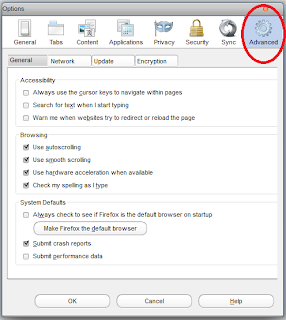


3. Click the Network tab.
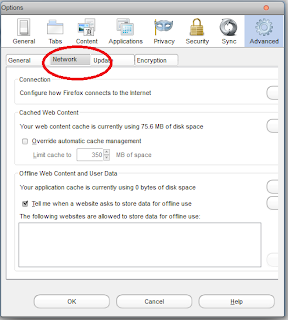


4. Now navigate to Settings and choose Manual proxy configuration.
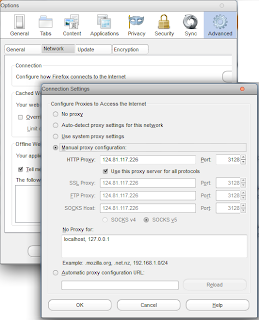


5. Find an Indonesian proxy on http://www.hidemyass.com/proxy-list and put it on your browser's manual proxy configuration.

6. Click okay and restart firefox. Navigate to google.com to check if your new proxy works.

7. If everything's working fine, go to Facebook.com and log-in your account.

8. Change Facebook's default language to Bahasa Indonesia.



9. Go to Account Settings and you can now remove your middle name and last name. Type your password to save changes.

10. You can now revert back to original facebook language and enjoy your custom facebook name.



HOW TO DOWNLOAD AT 4SHARED WITHOUT LOGGING IN


FOLLOW THE STEPS BELOW ON HOW TO DOWNLOAD AT 4SHARED WITHOUT LOGGING IN.

1. Go to 4shared.com and look for the file you want to download.

2. Copy the link or URL of the file. It is found on your browser's address bar on the top.

3. Go to www.4server.info.

4. Paste the url of the file you want to download. See screenshot below.


5. Click generate link.

6. Done. You can now download any files from 4shared without logging in.

Wednesday, June 13, 2012

FACEBOOK2ZIP: DOWNLOAD ALL YOUR FACEBOOK PHOTOS IN A SINGLE ZIP ARCHIVE

According to its introductory description, Facebook2zip is a free application that allows you to download your Facebook photos in a single zip/rar archive.

You can also download all of your friends' photos in thte same way.

Try it! It's easy and free.

REQUIREMENTS:

1. Valid Facebook account.
2. Knowledge about archiving(We are going to use WinRar to handle .rar and .zip files. Google for it.)

Okay! Let's get in to rockin'.

PROCEDURE:

1. Click HERE to start.

2. Click on "Login with facebook" at the bottom of the page and grant the permission for the app.

3. After logging in and granting the app, select your name or your friend's name if you want to download his photos then click next.


4. Choose the album that you want to download and click Download. You can also select all the albums.


5. Wait for the download to finish and you are on your way of seeing your pictures, intact in a single archive.


Friday, April 27, 2012

WATCH DORAEMON IN TAGALOG

[FOR PINOYS]


Ang Doraemon ay isang seryeng manga na nilikha ni Fujiko F. Fujio (ang pen name ni Hiroshi Fujimoto, na kinalaunan ay naging seryeng anime. Ang serye ay tungkol sa isang pusang robot na nagngangalang Doraemon, na naglakbay pabalik sa panahon mula sa ika-22 dantaon upang tulungan ang isang batang mag-aaral, si Nobita Nobi.


WATCH IT HERE: DORAEMON TAGALOG TV

ENJOY!

Thursday, April 26, 2012

TIMELINE REMOVER: DISABLE FACEBOOK TIMELINE


Do you want to disable your Facebook Timeline?

READ!!!
If you don’t like the new Timeline feature on Facebook and want to view profiles in the old style,
then TimelineRemove is the perfect extension for you. This tiny, but handy tool disables
the new Facebook timeline feature and restores the classic look,
without changing the timeline behavior for other visitors of your Facebook profile.
The extension basically works by hiding the timeline, so you can view your own and others’ profiles
in the old style.
TimelineRemove works automatically once installed, and a button is added to the toolbar that lets
you toggle the timeline on and off, whenever you want.


Click on the link to start: TIMELINE REMOVER

Then choose your browser to install the add-on. See screenshot below.


Click allow to install addon. Then wait for the download to finish.


VOILA! You are done. You can now browse Facebook with hidden timeline.
Drop your comments and questions below.

Sunday, April 15, 2012

HOTFILE.COM FREE USER NO WAITING TIME DOWNLOAD TRICK


Open any hotfile page and click regular download.

Paste the code below in the address bar.

Code:

javascript:document.forms.f.submit();


Then you will be redirected to download!


Note: JAVA is needed to make it work.
Enjoy.

Tuesday, March 27, 2012

TEXT TWIST SOLVER

Do you love playing Gamehouse's Text Twist? Here's a good solver for you guys. Just seach TEXT TWIST SOLVER on Google and click on the very first link.


It will take you the site's homepage. If you find difficulties on finding the words on the text twist game, just type the letters on the provided text box and click on the find words button. See screenshots below.


Hit the comments!


Thursday, February 9, 2012

PLAY ANDROID GAMES ON PC [NO PHONE REQUIRED]

Do you own an android phone or device? Have you ever wondered about running android games, apps, and stores on your own pc or laptop? Now it is made possible by this very cool application that I found just this morning.

The application is called YouWave.


It is easy to install, easy to use and it is the fastest way to run Android on your computer.

Check this video below to see how it works.


To get the YouWave app, just visit http://youwave.com/.

DOWNLOAD AND INSTALL and you're ready to go!

Monday, January 30, 2012

CONVERT YOUTUBE VIDEOS TO MP3 - NO SOFTWARE NEEDED


Use this online video converter to convert videos from any websites like YouTube, DailyMotion, Metacafe, and many more.

Just visit www.flv2mp3.com. In Flv2Mp3, you are given two options on how to convert your videos. Convert by Link and Convert by Upload.

Convert By Link:

1. Just copy the link or the url of the video that you would like to convert and paste in on the Convert by Link tab. View the screenshots below.


2. After you have pasted the link, check convert to mp3 or convert to other format. Then, click the Next button.


3. Wait for your converted video. A download window will pop-up to confirm the download and save it in your pc.


Enjoy browsing on your favorite music videos on YouTube and convert it to mp3. It is totally free. No software needed. No messy installations. Have a nice day!

Saturday, January 28, 2012

INSTALL SOPA (STOP ONLINE PIRACY ACT) RIBBON TO YOUR BLOGGER BLOGS


What is SOPA?

The Stop Online Piracy Act (SOPA) is a United States bill introduced by U.S. Representative Lamar S. Smith (R-TX) to expand the ability of U.S. law enforcement to fight online trafficking in copyrighted intellectual property and counterfeit goods. Provisions include the requesting of court orders to bar advertising networks and payment facilities from conducting business with infringing websites, and search engines from linking to the sites, and court orders requiring Internet service providers to block access to the sites. The law would expand existing criminal laws to include unauthorized streaming of copyright material, imposing a maximum penalty of five years in prison.

Credits to: Wikipedia


INSTALL SOPA RIBBON TO BLOGGER BLOGS

1. Click Layout >> Add A Gadget >> HTML/Javascript.

2. Copy and paste the code below.


3. Hit "Save".

Friday, January 27, 2012

3 DIFFERENT METHODS TO FORMAT USB FLASH DRIVES


Most of us use flash drives these days. Some call it pen drive, usb drive, portable drive, etc. It is handy, easy to carry, fast, and most importantly it is very useful in transferring data from one computer to another.

Unfortunately, flash drives are very vulnerable to viruses and malwares. These viruses may damage the files inside your flash drives. One thing that can solve this particular issue is by formatting it. Now, I am going to teach you 3 different methods on formatting a flash drive.

METHOD 1:

1. Plug your flash drive in the computer.

2. Click on My Computer. Find your flash drive and right-click it.

3. Then choose Format.


4. Click the Start button.


METHOD 2: Use the Command prompt.

1. Open command prompt(cmd) by clicking Start >> All Programs >> Accessories >> CMD. You can also do it by clicking Run, then type CMD.


2. On the command prompt, type the word "format" plus the drive letter of your flash drive. For example, Removable Disk F:, the drive letter is F:. View screenshot below.


3. If prompted with a (Y/N), type Y then press Enter. Wait for the format to complete.


METHOD 3: Use the Disk Management.

1. Click Start, click Run, type compmgmt.msc, and then click OK.

2. In the console tree, select Disk Management.


3. Right-click on your flash drive then select Format.


That's it!

[NOTE: IF YOUR FLASH DRIVE SUFFERS FROM AN ERROR THAT IT CANNOT BE FORMATTED BY ANY OF METHODS, MAYBE YOUR FLASH DRIVE'S HARDWARE IS SEVERELY DAMAGED.]


Feel free to ask me a question in the comments.


HOW TO AUTOMATICALLY SHARE YOUR BLOG POSTS TO FACEBOOK


Social networking sites are necessary on generating traffic to your blog. Let us put Facebook on the first place. You want all of your Facebook friends to know about your blog and you want them to visit it. Well, here's a nice app for you guys.

RSS GRAFFITI

RSS Grafitti makes it really easier to share your blog posts and any other social activity on your fans and friends on Facebook. This works with any website or blog that has and RSS or Atom feed.

[IMPORTANT!!! Before we set up RSS Graffiti, be sure that you have a facebook page for your blog.]

SETTING UP RSS GRAFFITI

1. Activate RSS Graffiti on Facebook. Click HERE to visit RSS Graffiti app on Facebook.
Allow the application to install on your profile, page and/or group. See the screenshot below.


2. On the RSS Graffiti app, click on the name of your blog's facebook fan page.


3. Add the feed of your blog. In blogger, the default feed address is http://nameofblog.blogspot.com/feeds/posts/default. Click the "+ Add Feed" button, to add the feed link of your blog and to verify that the blog feed is working.


4. Hit "Save" and your done.

Whenever you publish a new post on your blog or website, RSS Graffiti will automatically post your blog posts on your facebook wall and on your fan's wall.


This simple tutorial teaches you how to automatically share your blog posts on facebook. Tune in for more tutorials.

Saturday, January 21, 2012

YouTube Trick: Play Snake on Youtube


Did you know that you can actually play Snake game on YouTube? Yes, you can! Here is a very simple trick that I discovered a month ago while I was watching a 20-minute video. So here's the very simple trick.

Click on any videos on YouTube. Notice that once the video loads, it shows up a small loading animation, the revolving dots (shown on the screenshot below).


Once you see the revolving dots, press the arrow down button on your keyboard. VOILA! Enjoy playing Snake while you wait for the video to load.

Wednesday, January 18, 2012

HOW TO COMPLETELY HIDE IMPORTANT FILES AND FOLDERS IN YOUR PC

All of us have many important and confidential files on our computers. Sometimes we might ask ourselves, "How can I hide them so that no one could ever access it aside from me?".

Now I am going to teach you how to COMPLETELY hide your files and folders. We will use the COMMAND PROMPT.

1. Open the command prompt(CMD). You can do it by clicking the windows orb or the Start button. Then click ALL PROGRAMS> ACCESSORIES> CMD.

2. We will use a sample folder on the drive D:. We will hide the sample folder using the command prompt.


On the command prompt, type the address of your folder or the directory of your efolder. In our sample case, we will type "d:" on the command prompt. Then press ENTER.


3. On the Command Prompt, type attrib (space) The filename or the name of the folder you want to hide (space) +s +h +r.


Your folder or file will now be completely hidden on your pc. You are the only one who can access it. To access your file or folder again, just open Windows Explorer and type the directory of your folder on the address bar. THAT'S IT!


Thursday, January 12, 2012

SEND FREE TEXTS TO ANY NETWORK [FREE AND WORKING]


Having trouble in prepaid loads on your mobile phones? Have you ever wondered about sending TEXT MESSAGES TO ALL NETWORKS without spending even a single peso? Good news pal! You can now send free text messages ABSOLUTELY FREE!

I introduce to you MAGTXT.COM.


magTXT.com is a free PC to Mobile text service that allows Filipinos in the Philippines and abroad to have seamless conversations with their loved ones in the Philippines.

Click here to access magTxt.com.

Tuesday, January 10, 2012

FIREFOX IS ALREADY RUNNING ERROR: EASY FIX

-
I have been using Firefox as my default browser for years and it is my favorite browser. Sometimes when I start my Firefox, it doesn't show up and it says "Firefox is already running, but is not responding. To open a new window, you must first close the existing Firefox process, or restart your system.".
-
Well, here is an easy fix. -
1. Open Windows Task Manager (CTRL+ALT+DEL). Or just right click on your taskbar and select Start Task Manager.
-
2. On the Task Manager, click on the Processes tab and find firefox.exe.
-

-
3. Then click the End Process button and press Yes.
-
4. Run the Firefox again and that's it!

Tuesday, January 3, 2012

TETRIS BATTLE HACK [UPDATED]


HERE IS THE VIDEO PROOF!
-

-
BATTLE 2P FEATURES :
-
• FAST LEVEL ( malaki bigay exp )
• FAST RANK ( 3secs ONLY / game )
pag nag start na ang game hayaan mo lang gumalaw yung kalaban mo wag kang gagalaw para WiN ka palagi .
• +99 COiNS / game ( WiN / LOSE )
• AUTO RESUME ( pde kang mag alt tab after mo ma start ang game )
• NO DEDUCTiON OF ENERGY / game ( unli energy )
• + 999 BONUS ENERGY / WiN
-
Coins, Rank Up's And Exp's Are Saveable
-
YOU NEED TO SIGNUP TO SYMBIANIZE WEBSITE TO ACCESS THE DOWNLOAD LINK. CLICK HERE TO SIGN UP.
-
AFTER YOU HAVE SIGNED UP, CLICK THE FULL TUTORIAL LINK BELOW.
-
[***FULL TUTORIAL***]
-
PLEASE LEAVE A COMMENT.
ENJOY.

Friday, December 30, 2011

FIREFOX: SECURE CONNECTION FAILED ERROR [FIXED]

Are you getting an error when opening a website on firefox saying SECURE CONNECTION FAILED or CERTIFICATE WARNINGS?


-
For a more detailed procedure on solving this one, click HERE!.
-
The error maybe caused by the following:
-
1. SSL protocol has been disabled
2. The site uses an older, insecure version of the SSL protocol
3. Certificate warnings
- Certificate will not be valid until (date)
- The certificate expired on (date)
- Certificate is only valid for (site name)
- The certificate is not trusted because it is self signed
- The certificate contains the same serial number as another certificate
- The OCSP server has no status for the certificate
-
If you see this error every time you open a website on Firefox, well here is the fix.
-
1. Check your computer's date and time settings. You should set it to the exact time and date so that the Firefox reads the website's identity certification on real time.
-
If any of the information above doesn't solve the error, you can always bypass the error.
-
1. On the warning page, click Or you can add an exception.
2. Click Add Exception.
The Add Security Exception dialog will appear.
3. Click Get Certificate.
4. Read the text describing the problems with this site.
5. Click Confirm Security Exception if you want to trust the site.
Credits: http://support.mozilla.org
-
That's it! Hope this helps!

Thursday, December 29, 2011

Make Extra Money Online by Liking Facebook Pages

Well, here's a good website that give lets you earn extra money by liking Facebook pages.

It is called Sumafan. First, you need to have a Facebook acount and a PayPal account. After creating an account on Sumafan, all you have to do is to like the Facebook Pages that they are offering. Every like has an equivalent credit and every credit is some CASH!
Signup to Sumafan here: http://en.sumafan.com/alta.php?Id=1164687381
Here is a proof that it is really working.

2 days pa lang ako sa site and I earned 1 euro already.
Extra pera ba ang gusto mo? Signup na! SUMAFAN
TUNE IN FOR MY NEXT POST: TETRIS BATTLE HACK FULL TUTORIAL

Sunday, December 25, 2011

Tetris Battle Hack 100% WORKING (LATEST)

May hack na ang Tetris Battle sa Facebook. Fiddler po ang gamit. Para sa gustong matuto, comment lang po kayo sa baba. Here is the video proof. http://adf.ly/4OfEd Basta comment lang po kayo sa baba kung gusto ninyong maging Rank 100 agad. LOL.

Get Chitika | Premium
Related Posts Plugin for WordPress, Blogger...