Showing posts with label PC Tips. Show all posts

Saturday, June 16, 2012

Marine Aquarium V3.2 [MUST TRY PC SCREENSAVER]


This will turn your PC into a real aquarium!

Featured Fishes :
Achilles Tang
Addis Butterflyfish
Blue Damselfish
Blue Ring Angelfish
Clearfin Lionfish
Clown Triggerfish
Copper-banded Butterflyfish
Emperor Angelfish
Flame Angelfish
Forceps Butterflyfish
French Angelfish
Koran Angelfish
Lionfish
Longfin Bannerfish
Percula Clownfish
Picassofish
Powder Blue Tang
Purple Tang
Queen Angelfish
Redfin Butterflyfish
Regal Tang
Rock Beauty Angelfish
Royal Gramma
SeaStar
Squarespot Anthias (male)
Threadfin Butterflyfish
Three Stripe Damselfish
Yellow Tang

Click HERE to download.
RAR PASSWORD: bryzjoe

Friday, April 27, 2012

WATCH DORAEMON IN TAGALOG

[FOR PINOYS]


Ang Doraemon ay isang seryeng manga na nilikha ni Fujiko F. Fujio (ang pen name ni Hiroshi Fujimoto, na kinalaunan ay naging seryeng anime. Ang serye ay tungkol sa isang pusang robot na nagngangalang Doraemon, na naglakbay pabalik sa panahon mula sa ika-22 dantaon upang tulungan ang isang batang mag-aaral, si Nobita Nobi.


WATCH IT HERE: DORAEMON TAGALOG TV

ENJOY!

Tuesday, March 27, 2012

NEVER BUY CD-R KING 16GB FLASH DRIVES


I just bought a 16gb flash drive from CD-R KING yesterday and i thought that it would be really nice. But when I plugged it on my computer it displayed 14.8gb. Hey men, it sucks.


On its casing, it says that it is a 16gb flash drive but its real capacity is on 14.8gb. Don't buy flash drives from CD-R KING eventhough it is cheap.

Monday, January 30, 2012

CONVERT YOUTUBE VIDEOS TO MP3 - NO SOFTWARE NEEDED


Use this online video converter to convert videos from any websites like YouTube, DailyMotion, Metacafe, and many more.

Just visit www.flv2mp3.com. In Flv2Mp3, you are given two options on how to convert your videos. Convert by Link and Convert by Upload.

Convert By Link:

1. Just copy the link or the url of the video that you would like to convert and paste in on the Convert by Link tab. View the screenshots below.


2. After you have pasted the link, check convert to mp3 or convert to other format. Then, click the Next button.


3. Wait for your converted video. A download window will pop-up to confirm the download and save it in your pc.


Enjoy browsing on your favorite music videos on YouTube and convert it to mp3. It is totally free. No software needed. No messy installations. Have a nice day!

Friday, January 27, 2012

3 DIFFERENT METHODS TO FORMAT USB FLASH DRIVES


Most of us use flash drives these days. Some call it pen drive, usb drive, portable drive, etc. It is handy, easy to carry, fast, and most importantly it is very useful in transferring data from one computer to another.

Unfortunately, flash drives are very vulnerable to viruses and malwares. These viruses may damage the files inside your flash drives. One thing that can solve this particular issue is by formatting it. Now, I am going to teach you 3 different methods on formatting a flash drive.

METHOD 1:

1. Plug your flash drive in the computer.

2. Click on My Computer. Find your flash drive and right-click it.

3. Then choose Format.


4. Click the Start button.


METHOD 2: Use the Command prompt.

1. Open command prompt(cmd) by clicking Start >> All Programs >> Accessories >> CMD. You can also do it by clicking Run, then type CMD.


2. On the command prompt, type the word "format" plus the drive letter of your flash drive. For example, Removable Disk F:, the drive letter is F:. View screenshot below.


3. If prompted with a (Y/N), type Y then press Enter. Wait for the format to complete.


METHOD 3: Use the Disk Management.

1. Click Start, click Run, type compmgmt.msc, and then click OK.

2. In the console tree, select Disk Management.


3. Right-click on your flash drive then select Format.


That's it!

[NOTE: IF YOUR FLASH DRIVE SUFFERS FROM AN ERROR THAT IT CANNOT BE FORMATTED BY ANY OF METHODS, MAYBE YOUR FLASH DRIVE'S HARDWARE IS SEVERELY DAMAGED.]


Feel free to ask me a question in the comments.


Monday, January 23, 2012

THIS COPY OF WINDOWS IS NOT GENUINE FIX - WINDOWS 7 AND XP


THIS COPY OF WINDOWS IS NOT GENUINE: probably one of the most annoying errors experienced by windows users. Now, I am going to teach you how to fix the error in less than 5 minutes whether you are using Windows Xp or Windows 7.

We are going to use the software called RemoveWAT for Windows 7 and RemoveWGA for Windows Xp. Run the software and in just a few clicks and computer restart your windows copy will be genuine.

Download the files below.

Windows 7: Download RemoveWAT

Windows Xp: Download RemoveWGA


The error "THIS COPY OF WINDOWS IS NOT GENUINE" will now be fixed. If any problem persist during the procedure, feel free to ask me. Drop it in the comments.


Saturday, January 21, 2012

YouTube Trick: Play Snake on Youtube


Did you know that you can actually play Snake game on YouTube? Yes, you can! Here is a very simple trick that I discovered a month ago while I was watching a 20-minute video. So here's the very simple trick.

Click on any videos on YouTube. Notice that once the video loads, it shows up a small loading animation, the revolving dots (shown on the screenshot below).


Once you see the revolving dots, press the arrow down button on your keyboard. VOILA! Enjoy playing Snake while you wait for the video to load.

Wednesday, January 18, 2012

HOW TO COMPLETELY HIDE IMPORTANT FILES AND FOLDERS IN YOUR PC

All of us have many important and confidential files on our computers. Sometimes we might ask ourselves, "How can I hide them so that no one could ever access it aside from me?".

Now I am going to teach you how to COMPLETELY hide your files and folders. We will use the COMMAND PROMPT.

1. Open the command prompt(CMD). You can do it by clicking the windows orb or the Start button. Then click ALL PROGRAMS> ACCESSORIES> CMD.

2. We will use a sample folder on the drive D:. We will hide the sample folder using the command prompt.


On the command prompt, type the address of your folder or the directory of your efolder. In our sample case, we will type "d:" on the command prompt. Then press ENTER.


3. On the Command Prompt, type attrib (space) The filename or the name of the folder you want to hide (space) +s +h +r.


Your folder or file will now be completely hidden on your pc. You are the only one who can access it. To access your file or folder again, just open Windows Explorer and type the directory of your folder on the address bar. THAT'S IT!


Tuesday, January 10, 2012

FIREFOX IS ALREADY RUNNING ERROR: EASY FIX

-
I have been using Firefox as my default browser for years and it is my favorite browser. Sometimes when I start my Firefox, it doesn't show up and it says "Firefox is already running, but is not responding. To open a new window, you must first close the existing Firefox process, or restart your system.".
-
Well, here is an easy fix. -
1. Open Windows Task Manager (CTRL+ALT+DEL). Or just right click on your taskbar and select Start Task Manager.
-
2. On the Task Manager, click on the Processes tab and find firefox.exe.
-

-
3. Then click the End Process button and press Yes.
-
4. Run the Firefox again and that's it!

Friday, December 30, 2011

FIREFOX: SECURE CONNECTION FAILED ERROR [FIXED]

Are you getting an error when opening a website on firefox saying SECURE CONNECTION FAILED or CERTIFICATE WARNINGS?


-
For a more detailed procedure on solving this one, click HERE!.
-
The error maybe caused by the following:
-
1. SSL protocol has been disabled
2. The site uses an older, insecure version of the SSL protocol
3. Certificate warnings
- Certificate will not be valid until (date)
- The certificate expired on (date)
- Certificate is only valid for (site name)
- The certificate is not trusted because it is self signed
- The certificate contains the same serial number as another certificate
- The OCSP server has no status for the certificate
-
If you see this error every time you open a website on Firefox, well here is the fix.
-
1. Check your computer's date and time settings. You should set it to the exact time and date so that the Firefox reads the website's identity certification on real time.
-
If any of the information above doesn't solve the error, you can always bypass the error.
-
1. On the warning page, click Or you can add an exception.
2. Click Add Exception.
The Add Security Exception dialog will appear.
3. Click Get Certificate.
4. Read the text describing the problems with this site.
5. Click Confirm Security Exception if you want to trust the site.
Credits: http://support.mozilla.org
-
That's it! Hope this helps!

Thursday, December 29, 2011

Make Extra Money Online by Liking Facebook Pages

Well, here's a good website that give lets you earn extra money by liking Facebook pages.

It is called Sumafan. First, you need to have a Facebook acount and a PayPal account. After creating an account on Sumafan, all you have to do is to like the Facebook Pages that they are offering. Every like has an equivalent credit and every credit is some CASH!
Signup to Sumafan here: http://en.sumafan.com/alta.php?Id=1164687381
Here is a proof that it is really working.

2 days pa lang ako sa site and I earned 1 euro already.
Extra pera ba ang gusto mo? Signup na! SUMAFAN
TUNE IN FOR MY NEXT POST: TETRIS BATTLE HACK FULL TUTORIAL

Tuesday, December 27, 2011

Akinator - The Mind Reader (THE BEST MIND READER ON THE WEB)

Kanina pa ako umiikot sa web and I found this very crazy mind reading guy, Akinator. Nahuhulaan niya talaga lahat ng iniisip mong character, fictional man o hindi. LOL.

Kailangan sagutin mo ng tama ang lahat ng itatanong niya sayo at talagang mahuhulaan niya talaga ang iniisip mo. Gusto mo i-try, click HERE!.
TRY IT FOR YOURSELF MGA KA-BLOG. Gusto niyo pa ng mga free games tulad ni Akinator? O di kaya ay mga internet tricks and downloads? I-click ITO!
TUNE IN FOR MY NEXT POST: ONLINE MONEY MAKING (FAST AND EASY) AND TETRIS BATTLE HACK ON FACEBOOK FULL TUTORIAL.

Sunday, December 25, 2011

Tetris Battle Hack 100% WORKING (LATEST)

May hack na ang Tetris Battle sa Facebook. Fiddler po ang gamit. Para sa gustong matuto, comment lang po kayo sa baba. Here is the video proof. http://adf.ly/4OfEd Basta comment lang po kayo sa baba kung gusto ninyong maging Rank 100 agad. LOL.

Thursday, October 27, 2011

How to bypass HandyCafe Client on Internet Cafes

In case you own an internet shop and you forgot your handycafe client password, or you just want to get directly into the desktop without passing the handycafe client, well here's a very simple and effective trick.

This trick works on any operating systems especially Windows XP.

1. Once the pc is turned on and handycafe banner is blocking you from accessing the desktop, restart the computer. you can do it by pressing the restart button on the cpu.

2. After the windows loading page appears, the desktop will show up for about 5-7 seconds. Press CTRL+ALT+DEL to access the Task Manager. On the Task Manager, click on the Processes tab. Then find "hndclient.exe".


3. Click on the End Process button then click Yes.


The handycafe client will now then be disabled and the handcafe banner will not show up. Enjoy guys.

Note: Be sure to be fast enough because we are talking about seconds. If the handycafe banner appears and before you disabled the hndclient.exe via task manager, you will have to get back to the procedure number 1 and repeat the whole process. Post your questions in the comments.

Sunday, October 23, 2011

How to migrate to the new Facebook Profile - The Timeline

To see the Timeline, click this link: Facebook Timeline

Here are some screenshots:


Read more for the tutorial.

To have the Timeline on your hands, follow these very easy instructions.

1. Log on to your Facebook account.

2. Visit the developers page here. Or at https://developers.facebook.com/apps

3. On the developers page, click on the "Create New App".


4. Fill out the App Display Name and Namespace. You can use any display name same as the screenshot below then click Continue.


5. Then click on the Open Graph.


6. On the Open Graph page, define an action and object for your app. You can use any action word and any object for your app. You can see an example below. After it, click the Get Started button.


7. On the next three procedures, just click Save Changes and Next. Then finally, click on the finish button. Go back to your facebook homepage or profile to activate your Timeline. Enjoy.

Friday, March 4, 2011

Earn Money with Mozilla Firefox! Totally free!

Have you ever heard about SPREAD FIREFOX? It is the program used by Mozilla to spread Firefox across the globe. Join their affiliate program and earn rewards for every download made through your link(ads). Why wait? Join now! Click here to join.

Mozilla Firefox is still the best browser, in my own opinion. What's the sense of using Internet Explorer? Download the latest version of Firefox now.
spread firefox affiliate button

Any suggestions? Jump to the comments.

Tuesday, February 22, 2011

How to delete a page on Facebook? 100% WORKING!

This tutorial will show you how to delete a page you created on Facebook. These are the steps:

1. Log in on Facebook using your username and password.

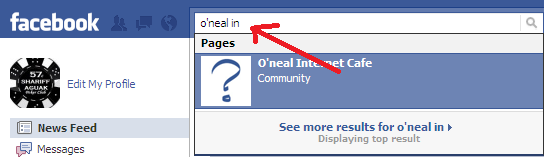
2. Type the name of the page you want to delete on the search bar.


3. On your page's homepage, click "edit page" on the left side of the screen just below the profile picture.


4. Click "Manage Permissions" on the side tab.


5. Below, click the "Permanently delete this page".


6. Now you're done.

Please hit the comments below.


Beer Gags

Sunday, February 13, 2011

Make Money Online - Affiliate

Most bloggers and site owners are having a hard time on making money online. Now I will share to you some free and useful affiliate sites.

1. Real Adventures

Real Adventures
Visit their site at http://realadventures.com/

2. Infolinks

http://www.infolinks.com

3. Surf With Money

http://www.surfwithmoney.com

4. Alpha Investments Inc.

http://alphainv.co.cc/?ref=andrespasilan

5. Euroinvest Banking

http://euro-invest.co.cc/?ref=2169000

Now make more money online my friend.

Thursday, February 10, 2011

Facebook Chat Problems

1. Repeated Text - Occasionally, a normal Facebook chat session will be derailed when one user's text is repeated, over and over again. Sometimes, a single sentence will appear five or six times, even though that user had only typed it once. It's a potentially embarrassing problem. If you type, "What time are you coming over?" and it displays as, "What time are you coming over? What time are you coming over? What time are you coming over?," for instance, it can send the wrong message. This problem is usually caused by a laggy
connection on the computer of one of the people in the Facebook chat session. By exiting programs that may be using bandwidth (for instance, P2P and torrent programs) you can limit the instance of this particular technical issue.

2. Sudden Logoffs - Sudden logoffs of the chat service are also common. The user may be logged completely out of Facebook in the middle of a chat, or may simply appear to be logged out for a second, though on their end everything looks fine. It's another bandwidth issue, but it's a bit more severe than the repeated text problem. Again, it can be limited by limiting bandwidth usage, or sometimes by restarting a computer and Internet router and modem.

3. Browser Conflicts - One particularly annoying problem is the tendency for some browsers, especially Firefox, to disable the keyboard when a new chat message is received on Facebook. This locking-out of the keyboard
happens when you're typing in another tab and you receive a message, and it requires the user to cycle through a few tabs in order to be resolved. You can cut down on the browser conflicts by keeping your browser updated, and by limiting the number of tabs that you've got open, and especially by avoiding having multiple tabs of Facebook open at the same time.

What problems have you experienced with Facebook chat? Share in our comments section below.

Credits:
http://associatedcontent.com/
http://yomaheart.blogpspot.com/
Raz

Kung gusto mo musubmit ug posts (article, pic, vid, etc,)
click on the link below.
http://razattitude.blogspot.com/2011/02/contact-us-submissiontips.html

Get Chitika | Premium
Related Posts Plugin for WordPress, Blogger...