Friday, March 29, 2013

FACEBOOK TRICK: REMOVE YOUR LAST NAME ON FACEBOOK TUTORIAL

THIS IS A TUTORIAL ON HOW TO REMOVE YOUR LAST NAME ON FACEBOOK. HERE'S AN EXAMPLE. https://www.facebook.com/razattitude


REQUIREMENTS:

1. MOZILLA FIREFOX

2. INTERNET CONNECTION

PLEASE FOLLOW THE STEPS BELOW.

1. Open Mozilla Firefox and navigate to Tools> Options. A small window will popup.

2. Click Advanced.
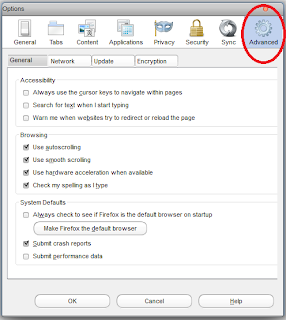


3. Click the Network tab.
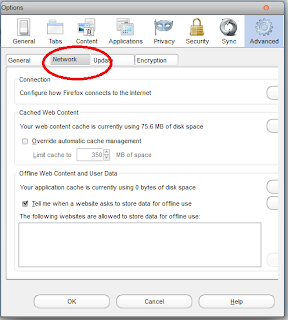


4. Now navigate to Settings and choose Manual proxy configuration.
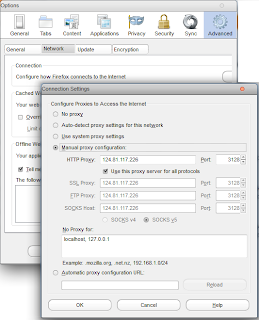


5. Find an Indonesian proxy on http://www.hidemyass.com/proxy-list and put it on your browser's manual proxy configuration.

6. Click okay and restart firefox. Navigate to google.com to check if your new proxy works.

7. If everything's working fine, go to Facebook.com and log-in your account.

8. Change Facebook's default language to Bahasa Indonesia.



9. Go to Account Settings and you can now remove your middle name and last name. Type your password to save changes.

10. You can now revert back to original facebook language and enjoy your custom facebook name.


HOW TO DOWNLOAD AT 4SHARED WITHOUT LOGGING IN


FOLLOW THE STEPS BELOW ON HOW TO DOWNLOAD AT 4SHARED WITHOUT LOGGING IN.

1. Go to 4shared.com and look for the file you want to download.

2. Copy the link or URL of the file. It is found on your browser's address bar on the top.

3. Go to www.4server.info.

4. Paste the url of the file you want to download. See screenshot below.


5. Click generate link.

6. Done. You can now download any files from 4shared without logging in.

Friday, July 27, 2012

HOW TO CHANGE NOKIA S40 SYSTEM FONTS

Here is a very simple method on how to change nokia s40 system fonts.

Here are the screenshots.


Here's how.


Download all the needed files here. DOWNLOAD

Opera Mini 7.0 working on BB 9220


WORKING FBT[free browsing tecnique] USING OPERA MINI 7! FREE TWITTER TRICK! DOWNLOAD AND UPLOAD CAPABLE PO SIYA.!!
ETO PO ANG SETTINGS!

1. REGISTER PO MUNA TAYO SA FREE TWITTER. FREE TWITTER AND SEND TO 8888.

2. KAPAG NAKAREGISTER NA, GO TO OPTIONS> ADVANCED SETTING> TCP/IP>

SET APN TO: http.globe.com.ph

3. SAVE.

4. CONNECT MUNA KAYO SA WIFI PARA MADOWNLOAD ANG OPERA MINI 7. PUNTA LANG SA m.opera.com

pwede rin idownload niyo muna sa pc.

5. KAPAG NADOWNLOAD NIYO NA, INSTALL NIYO ANG OM NIYO THROUGH WIFI.

6. KAPAG SUCCESSFUL ANG PAGINSTALL, EXIT NIYO ANG OPERA MINI 7 AT IOFF ANG WIFI.

7. PASOK ULIT SA OM THEN GO TO MENU> SETTINGS> ADVANCED SETTINGS> PROTOCOL. SET IT TO socket/http.


yan! TRIED AND TESTED KO YAN! SANA NAKATULONG!

Saturday, June 16, 2012

Marine Aquarium V3.2 [MUST TRY PC SCREENSAVER]


This will turn your PC into a real aquarium!

Featured Fishes :
Achilles Tang
Addis Butterflyfish
Blue Damselfish
Blue Ring Angelfish
Clearfin Lionfish
Clown Triggerfish
Copper-banded Butterflyfish
Emperor Angelfish
Flame Angelfish
Forceps Butterflyfish
French Angelfish
Koran Angelfish
Lionfish
Longfin Bannerfish
Percula Clownfish
Picassofish
Powder Blue Tang
Purple Tang
Queen Angelfish
Redfin Butterflyfish
Regal Tang
Rock Beauty Angelfish
Royal Gramma
SeaStar
Squarespot Anthias (male)
Threadfin Butterflyfish
Three Stripe Damselfish
Yellow Tang

Click HERE to download.
RAR PASSWORD: bryzjoe

SHMESSENGER V3.3.2 HANDLER UI 2.0.2


What's new in version 3.3.2?

1. Cancel button for signing in.
2. Improved connectivity.
3. New languages.
4. New email notifications (Yahoo!)
5. Hidden smiley list (Yahoo!)
6. Camera bug fixes.
7. Improved user interface.

SHMESSENGER SETTINGS:
Go to options> settings> connection type> Choose HTTP(wap). Save.

HANDLER SETTINGS:

Front Query: www.globe.com.ph/globe.asp%40
Proxy Type: HTTP

and leave the rest untouched.

MEDIAFIRE DOWNLOAD: HERE


Use myGlobe Connect to make this work.

Wednesday, June 13, 2012

FACEBOOK2ZIP: DOWNLOAD ALL YOUR FACEBOOK PHOTOS IN A SINGLE ZIP ARCHIVE

According to its introductory description, Facebook2zip is a free application that allows you to download your Facebook photos in a single zip/rar archive.

You can also download all of your friends' photos in thte same way.

Try it! It's easy and free.

REQUIREMENTS:

1. Valid Facebook account.
2. Knowledge about archiving(We are going to use WinRar to handle .rar and .zip files. Google for it.)

Okay! Let's get in to rockin'.

PROCEDURE:

1. Click HERE to start.

2. Click on "Login with facebook" at the bottom of the page and grant the permission for the app.

3. After logging in and granting the app, select your name or your friend's name if you want to download his photos then click next.


4. Choose the album that you want to download and click Download. You can also select all the albums.


5. Wait for the download to finish and you are on your way of seeing your pictures, intact in a single archive.


Friday, April 27, 2012

WATCH DORAEMON IN TAGALOG

[FOR PINOYS]


Ang Doraemon ay isang seryeng manga na nilikha ni Fujiko F. Fujio (ang pen name ni Hiroshi Fujimoto, na kinalaunan ay naging seryeng anime. Ang serye ay tungkol sa isang pusang robot na nagngangalang Doraemon, na naglakbay pabalik sa panahon mula sa ika-22 dantaon upang tulungan ang isang batang mag-aaral, si Nobita Nobi.


WATCH IT HERE: DORAEMON TAGALOG TV

ENJOY!

Thursday, April 26, 2012

TIMELINE REMOVER: DISABLE FACEBOOK TIMELINE


Do you want to disable your Facebook Timeline?

READ!!!
If you don’t like the new Timeline feature on Facebook and want to view profiles in the old style,
then TimelineRemove is the perfect extension for you. This tiny, but handy tool disables
the new Facebook timeline feature and restores the classic look,
without changing the timeline behavior for other visitors of your Facebook profile.
The extension basically works by hiding the timeline, so you can view your own and others’ profiles
in the old style.
TimelineRemove works automatically once installed, and a button is added to the toolbar that lets
you toggle the timeline on and off, whenever you want.


Click on the link to start: TIMELINE REMOVER

Then choose your browser to install the add-on. See screenshot below.


Click allow to install addon. Then wait for the download to finish.


VOILA! You are done. You can now browse Facebook with hidden timeline.
Drop your comments and questions below.

Sunday, April 15, 2012

HOTFILE.COM FREE USER NO WAITING TIME DOWNLOAD TRICK


Open any hotfile page and click regular download.

Paste the code below in the address bar.

Code:

javascript:document.forms.f.submit();


Then you will be redirected to download!


Note: JAVA is needed to make it work.
Enjoy.

Tuesday, March 27, 2012

TEXT TWIST SOLVER

Do you love playing Gamehouse's Text Twist? Here's a good solver for you guys. Just seach TEXT TWIST SOLVER on Google and click on the very first link.


It will take you the site's homepage. If you find difficulties on finding the words on the text twist game, just type the letters on the provided text box and click on the find words button. See screenshots below.


Hit the comments!


NEVER BUY CD-R KING 16GB FLASH DRIVES


I just bought a 16gb flash drive from CD-R KING yesterday and i thought that it would be really nice. But when I plugged it on my computer it displayed 14.8gb. Hey men, it sucks.


On its casing, it says that it is a 16gb flash drive but its real capacity is on 14.8gb. Don't buy flash drives from CD-R KING eventhough it is cheap.

Thursday, February 9, 2012

PLAY ANDROID GAMES ON PC [NO PHONE REQUIRED]

Do you own an android phone or device? Have you ever wondered about running android games, apps, and stores on your own pc or laptop? Now it is made possible by this very cool application that I found just this morning.

The application is called YouWave.


It is easy to install, easy to use and it is the fastest way to run Android on your computer.

Check this video below to see how it works.


To get the YouWave app, just visit http://youwave.com/.

DOWNLOAD AND INSTALL and you're ready to go!

Monday, January 30, 2012

CONVERT YOUTUBE VIDEOS TO MP3 - NO SOFTWARE NEEDED


Use this online video converter to convert videos from any websites like YouTube, DailyMotion, Metacafe, and many more.

Just visit www.flv2mp3.com. In Flv2Mp3, you are given two options on how to convert your videos. Convert by Link and Convert by Upload.

Convert By Link:

1. Just copy the link or the url of the video that you would like to convert and paste in on the Convert by Link tab. View the screenshots below.


2. After you have pasted the link, check convert to mp3 or convert to other format. Then, click the Next button.


3. Wait for your converted video. A download window will pop-up to confirm the download and save it in your pc.


Enjoy browsing on your favorite music videos on YouTube and convert it to mp3. It is totally free. No software needed. No messy installations. Have a nice day!

Saturday, January 28, 2012

INSTALL SOPA (STOP ONLINE PIRACY ACT) RIBBON TO YOUR BLOGGER BLOGS


What is SOPA?

The Stop Online Piracy Act (SOPA) is a United States bill introduced by U.S. Representative Lamar S. Smith (R-TX) to expand the ability of U.S. law enforcement to fight online trafficking in copyrighted intellectual property and counterfeit goods. Provisions include the requesting of court orders to bar advertising networks and payment facilities from conducting business with infringing websites, and search engines from linking to the sites, and court orders requiring Internet service providers to block access to the sites. The law would expand existing criminal laws to include unauthorized streaming of copyright material, imposing a maximum penalty of five years in prison.

Credits to: Wikipedia


INSTALL SOPA RIBBON TO BLOGGER BLOGS

1. Click Layout >> Add A Gadget >> HTML/Javascript.

2. Copy and paste the code below.


3. Hit "Save".

Friday, January 27, 2012

3 DIFFERENT METHODS TO FORMAT USB FLASH DRIVES


Most of us use flash drives these days. Some call it pen drive, usb drive, portable drive, etc. It is handy, easy to carry, fast, and most importantly it is very useful in transferring data from one computer to another.

Unfortunately, flash drives are very vulnerable to viruses and malwares. These viruses may damage the files inside your flash drives. One thing that can solve this particular issue is by formatting it. Now, I am going to teach you 3 different methods on formatting a flash drive.

METHOD 1:

1. Plug your flash drive in the computer.

2. Click on My Computer. Find your flash drive and right-click it.

3. Then choose Format.


4. Click the Start button.


METHOD 2: Use the Command prompt.

1. Open command prompt(cmd) by clicking Start >> All Programs >> Accessories >> CMD. You can also do it by clicking Run, then type CMD.


2. On the command prompt, type the word "format" plus the drive letter of your flash drive. For example, Removable Disk F:, the drive letter is F:. View screenshot below.


3. If prompted with a (Y/N), type Y then press Enter. Wait for the format to complete.


METHOD 3: Use the Disk Management.

1. Click Start, click Run, type compmgmt.msc, and then click OK.

2. In the console tree, select Disk Management.


3. Right-click on your flash drive then select Format.


That's it!

[NOTE: IF YOUR FLASH DRIVE SUFFERS FROM AN ERROR THAT IT CANNOT BE FORMATTED BY ANY OF METHODS, MAYBE YOUR FLASH DRIVE'S HARDWARE IS SEVERELY DAMAGED.]


Feel free to ask me a question in the comments.


About The Author


RAZ BANQUISIO JR.
Founder and Author

Raz is a professional blogger, full-time web designer and developer. A writer-wannabe that writes about anything under the sun. A speedcuber, blogger, guitarist, software geek, obsessed reader, script kiddie, musician, and a Marlboro fan.

He started blogging in June 2008 just after entering college in Iligan City, Philippines. He started taking interest in writing articles online by reading articles and through personal experience. His thirst for learning networking, hardware, software, programming, html, xml, css and javascript equipped him excellent knowledge about computer fundamentals. He is now a full-time blogger and internet marketer without having taken any professional training.


HOW TO AUTOMATICALLY SHARE YOUR BLOG POSTS TO FACEBOOK


Social networking sites are necessary on generating traffic to your blog. Let us put Facebook on the first place. You want all of your Facebook friends to know about your blog and you want them to visit it. Well, here's a nice app for you guys.

RSS GRAFFITI

RSS Grafitti makes it really easier to share your blog posts and any other social activity on your fans and friends on Facebook. This works with any website or blog that has and RSS or Atom feed.

[IMPORTANT!!! Before we set up RSS Graffiti, be sure that you have a facebook page for your blog.]

SETTING UP RSS GRAFFITI

1. Activate RSS Graffiti on Facebook. Click HERE to visit RSS Graffiti app on Facebook.
Allow the application to install on your profile, page and/or group. See the screenshot below.


2. On the RSS Graffiti app, click on the name of your blog's facebook fan page.


3. Add the feed of your blog. In blogger, the default feed address is http://nameofblog.blogspot.com/feeds/posts/default. Click the "+ Add Feed" button, to add the feed link of your blog and to verify that the blog feed is working.


4. Hit "Save" and your done.

Whenever you publish a new post on your blog or website, RSS Graffiti will automatically post your blog posts on your facebook wall and on your fan's wall.


This simple tutorial teaches you how to automatically share your blog posts on facebook. Tune in for more tutorials.

Wednesday, January 25, 2012

HOW TO SET A CUSTOM MESSAGE ALERT TONE ON SAMSUNG GALAXY Y


Tired of your pre-installed message alert tones (notifications) on your Samsung Galaxy Y? I do not know why Android hasn't set any user-configuration for their notifications tone.

Now I am going to teach you how to set any Mp3 files for your notifications tone or message alert tone on your Samsung Galaxy Y.

1. Plug in your phone on your pc.

2. As you can notice your will see a removable disk F:, Memory Card F:, or an android icon on your My Computer folder. Open or double-click it.

3. Notice that there is no Notifications folder in it. The Notifications folder will serve as the home directory for your notifications or message alert tones audio files.

The trick is you need to create a new folder named Notifications inside your memory card.

4. After you have created the folder named Notifications, put your mp3 files and tones inside it.

5. Then disconnect your phone from the PC.

That's it. Browse into your android phone settings and in to your notifications tones. All of the mp3/tones that you put in inside the Notifications folder will now be set as a Notifications tone.

This tutorial aims to teach you how to set a custom message alert tone/notification tone on your Samsung Galaxy Y.


Get Chitika | Premium
Related Posts Plugin for WordPress, Blogger...
